Rostering for gyms, clubs and shops

Shifts, cover and pay. One roster.

Club Roster builds your week with cover checked to the minute, puts every shift on your team's phone, and shows the cost against budget before you publish.

Made in New Zealand. We set you up. Free for shops with up to 10 employees.

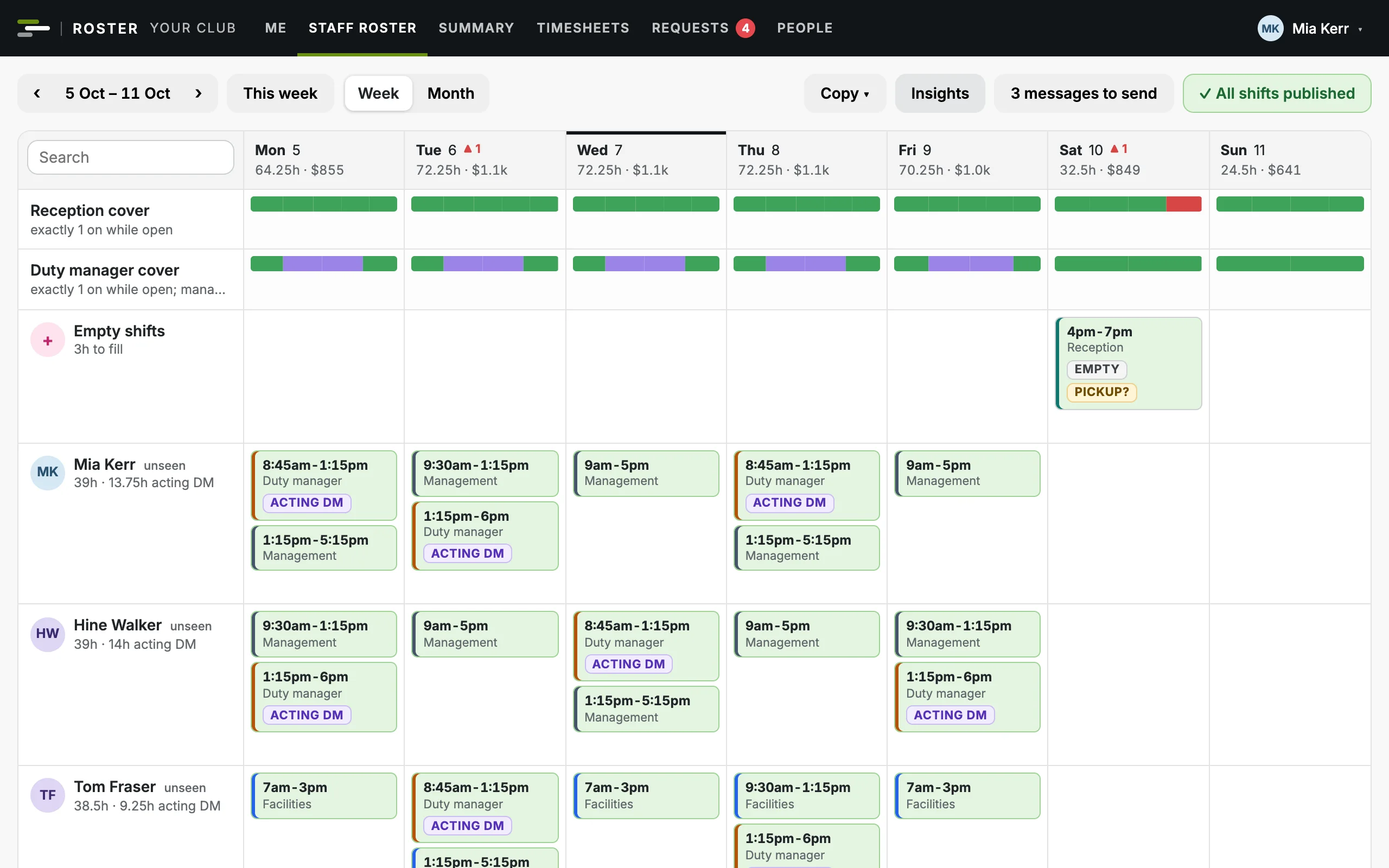
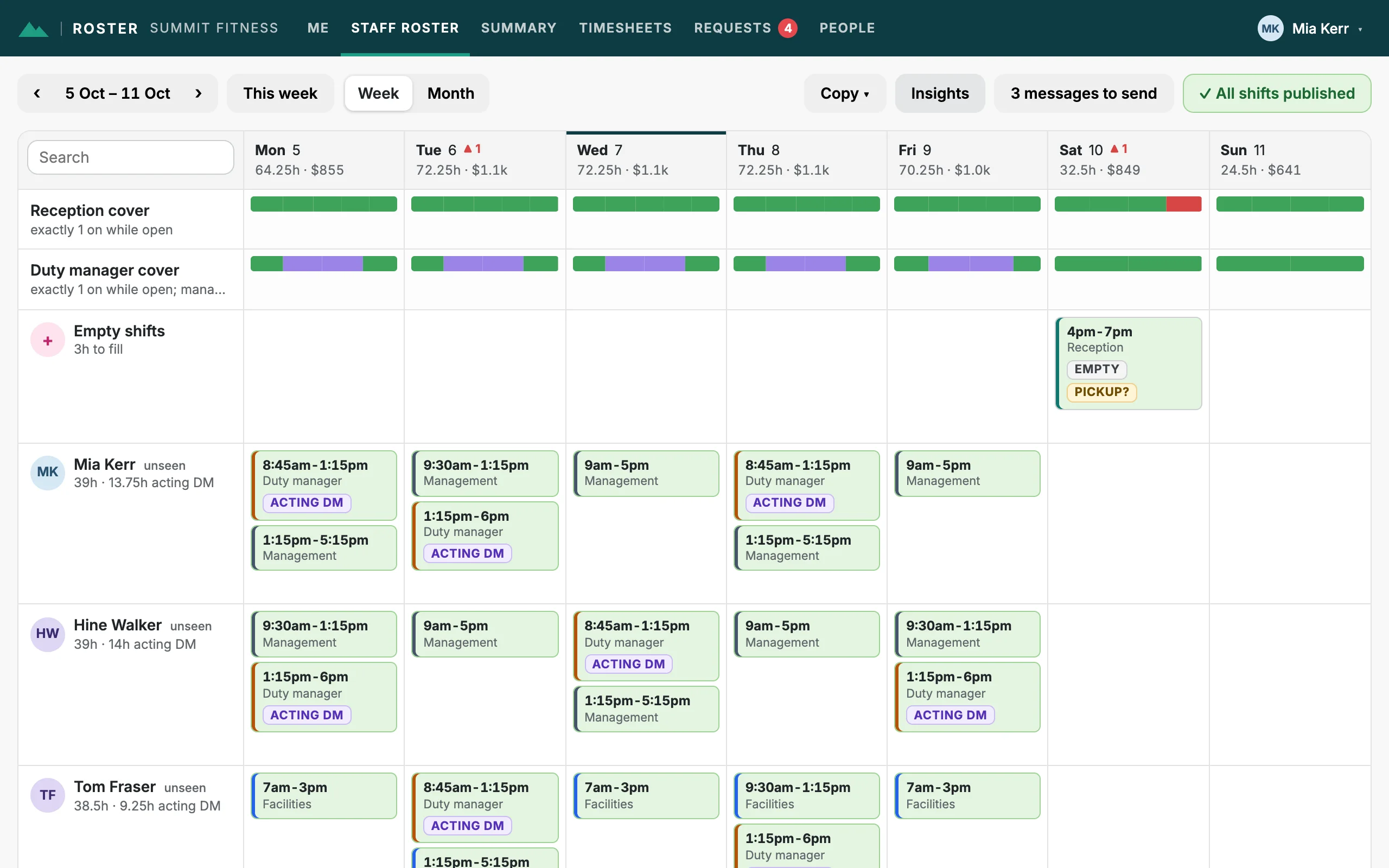
The staff roster for a week: cover bars for each area, and each person's shifts, coloured by area
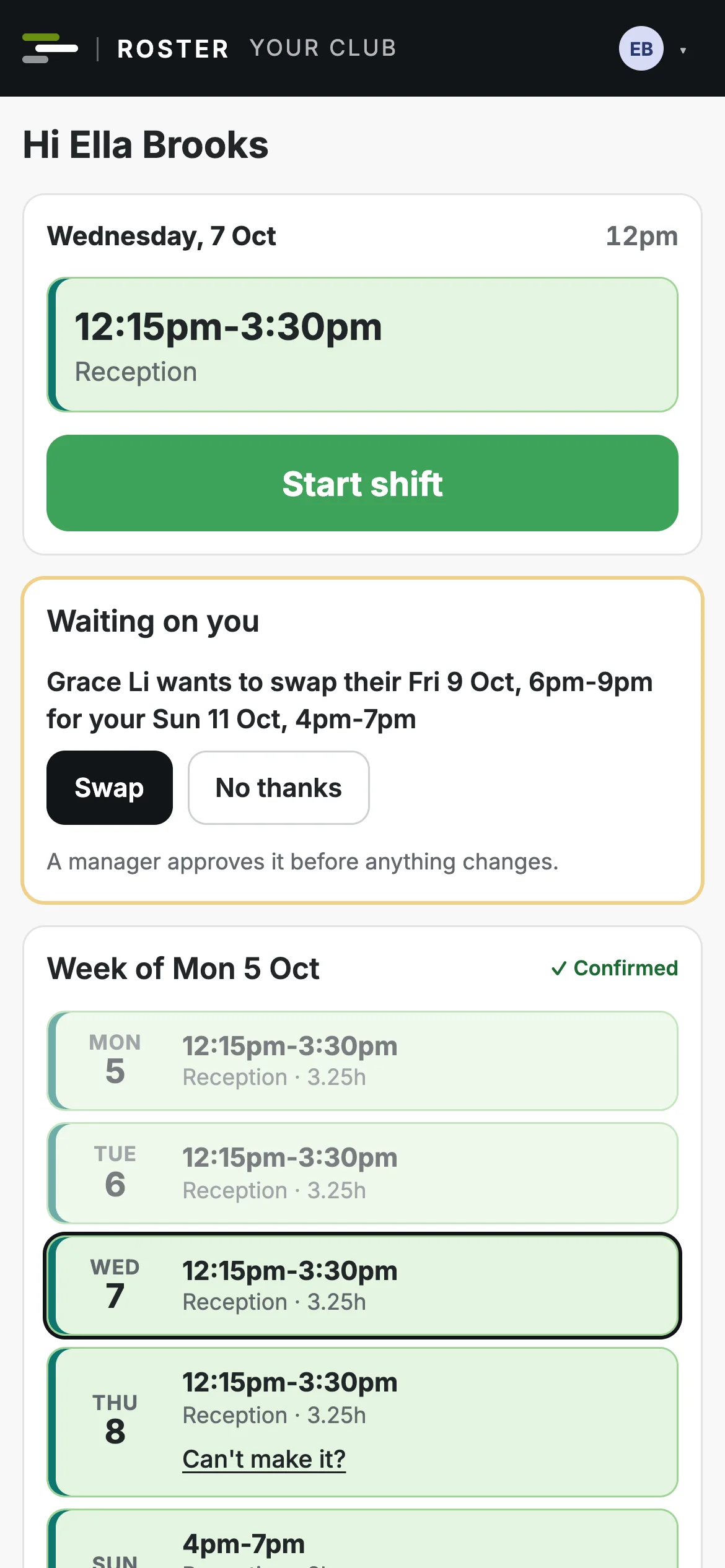
A team member's phone: today's shift with a Start shift button, and their week

Built for the way you run

One app, set up for your kind of business: the same roster, team app, timesheets and budgets, with what a gym or a shop needs on top.

Gyms and clubs

A front desk on shifts, and a timetable of classes taught by instructors.

  • The staff roster and the class timetable side by side.
  • Cover offered to instructors qualified and free to take it.
  • Statements to invoice from, and invoices checked against them.
Club Roster for gyms and clubs

Shops

A floor to cover while you're open, at one store or several.

  • Cover checked for each area at each store.
  • Each store's own opening hours and closed days.
  • Free for up to 10 employees.
Club Roster for shops
Staff roster

Build next week in minutes

Start from each person's usual week or copy a recent one, then drag shifts into place. Cover bars show every gap to the minute, so nothing goes out short.

  • Drag to move, hold Alt to copy, drop on a shift to swap. Undo if you change your mind.
  • Fill from everyone's usual week, or copy any of the last four weeks.
  • Checks for gaps, availability, breaks, rest between shifts and weekly hours.
  • Publish, and only the people whose shifts changed are told.
A week on the staff roster, with green cover bars and published shifts
The team app

Everyone's week in their pocket

Your team get the roster on their phone without an app store: they sign in with their email and add it to the home screen.

  • Their shifts, with a "Got it" when a new week is published.
  • Swap, give away or pick up shifts, ask for leave and set their availability.
  • Clock in and out from their phone.
  • Shifts in their own phone calendar, kept up to date.
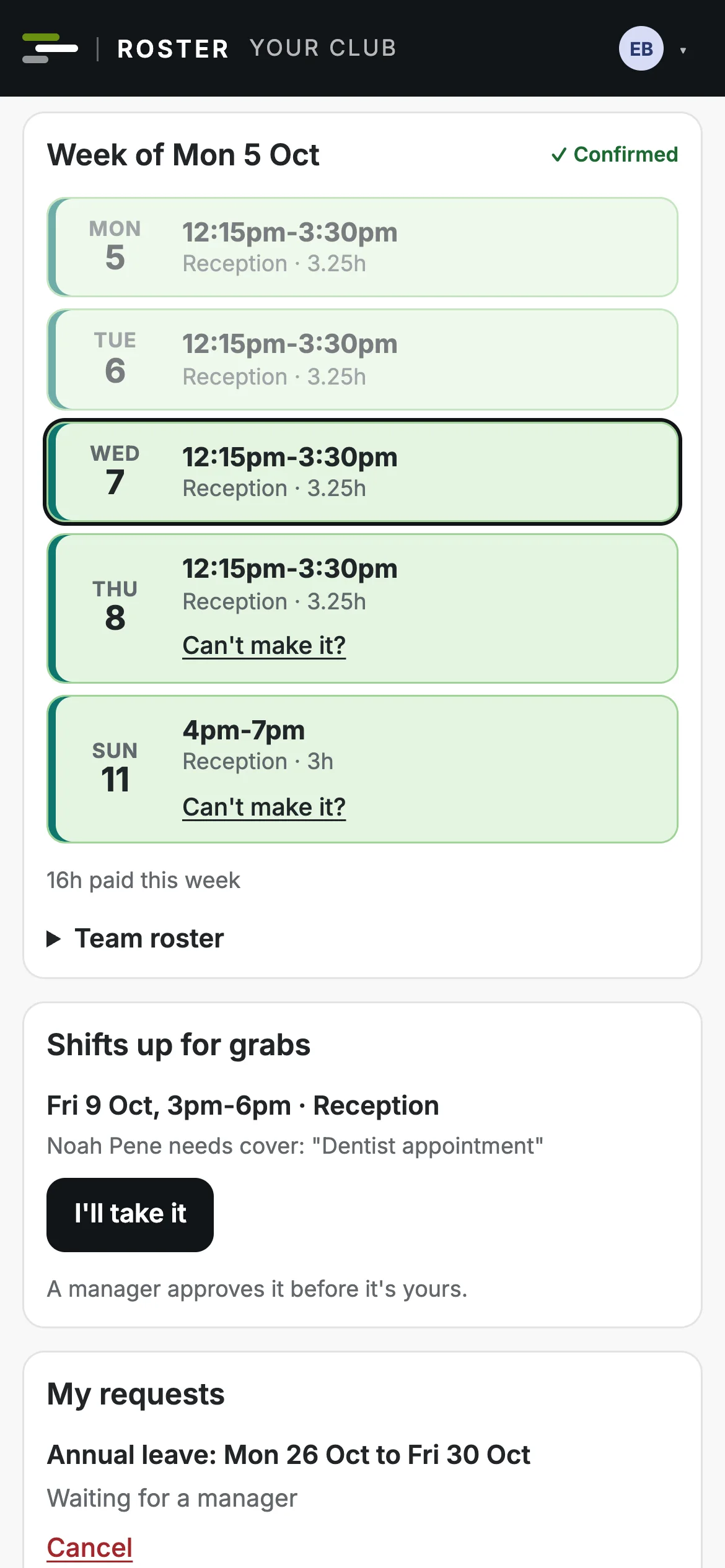
A team member's week on their phone, with Can't make it? under a shift
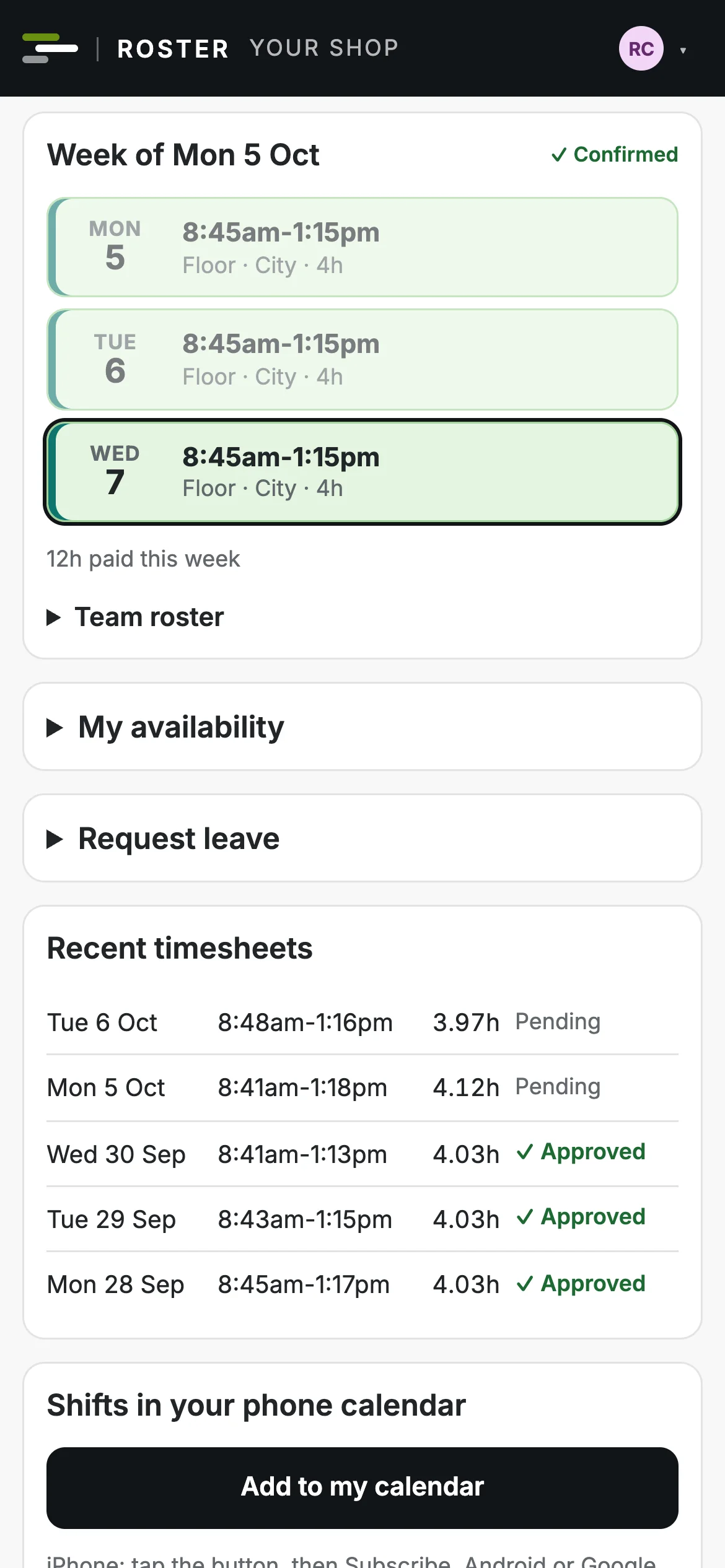
A shop team member's week on their phone, confirmed, with their recent timesheets
Time and pay

Timesheets that check themselves

Clock-ins are matched to the roster, so late starts, early finishes and missed clock-outs stand out before payday.

  • Approve timesheets one at a time or all at once.
  • Export approved hours as a CSV for your payroll.
  • Unpaid meal breaks taken off shifts long enough to have one.
  • For gyms: instructors' statements to invoice from, and every invoice checked.
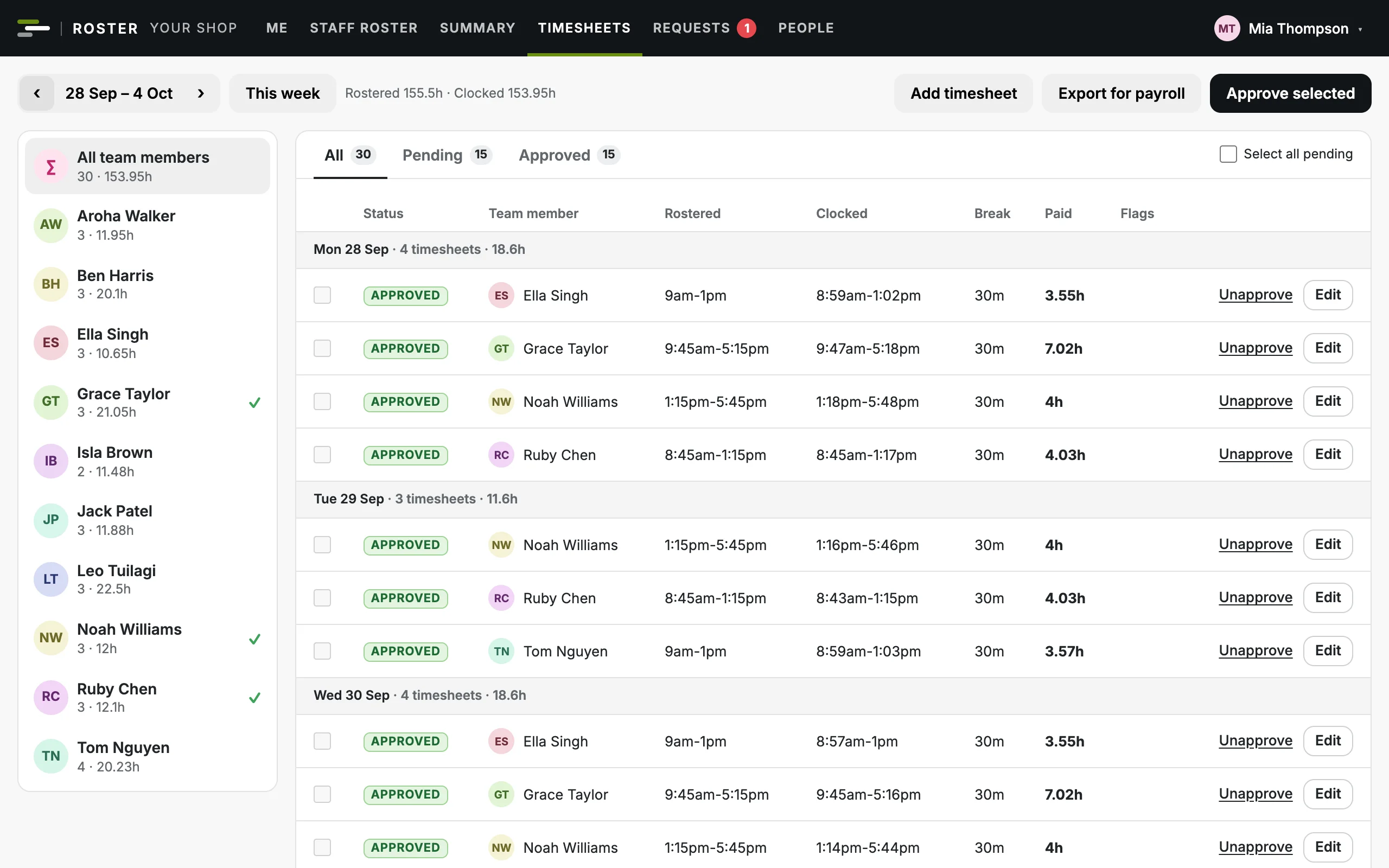
Last week's timesheets: rostered and clocked times for each person, approved or waiting
Costs and budgets

See the cost before you publish

Every shift is costed as you build: hourly wages, salaries, on-cost and public holiday pay, and class fees for gyms. Set a budget for each cost centre by month and see where the month will land.

  • Green, amber or red against budget for each cost centre, while you roster.
  • A month forecast: spent so far, plus what's rostered, plus days still to build.
  • Paste a year of budgets straight from your spreadsheet.
  • Download it all as CSV for your accountant.
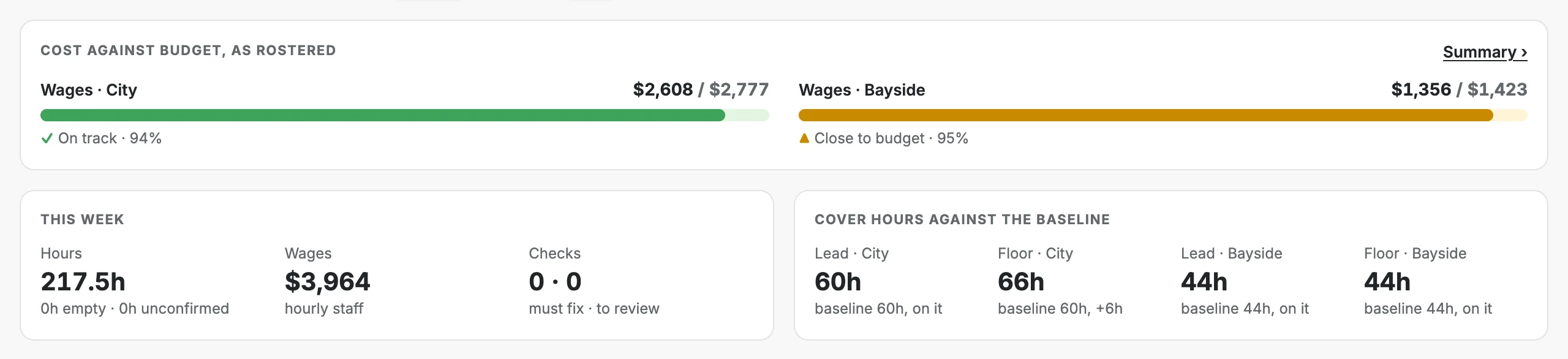
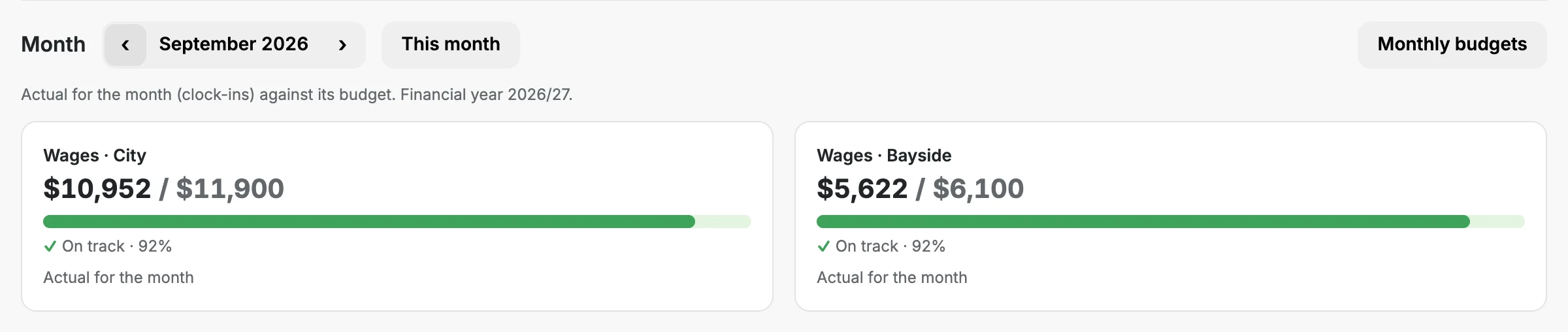
Wages against budget as rostered for two stores, with the week's hours and cover
Last month's wages for each store against its monthly budget
Made for New Zealand

New Zealand rules, built in

Public holidays, Mondayised days and Matariki are flagged as you roster, with time and a half and alternative holidays. So are minimum wage, guaranteed hours, unpaid breaks, rest between shifts and long runs of days.

  • New Zealand public holidays, worked out for every year.
  • Guaranteed hours compared with what's rostered, with a four-week average.
  • Pay kept with the date it changed, so past weeks keep their cost.
  • Dates, times and dollars the New Zealand way.
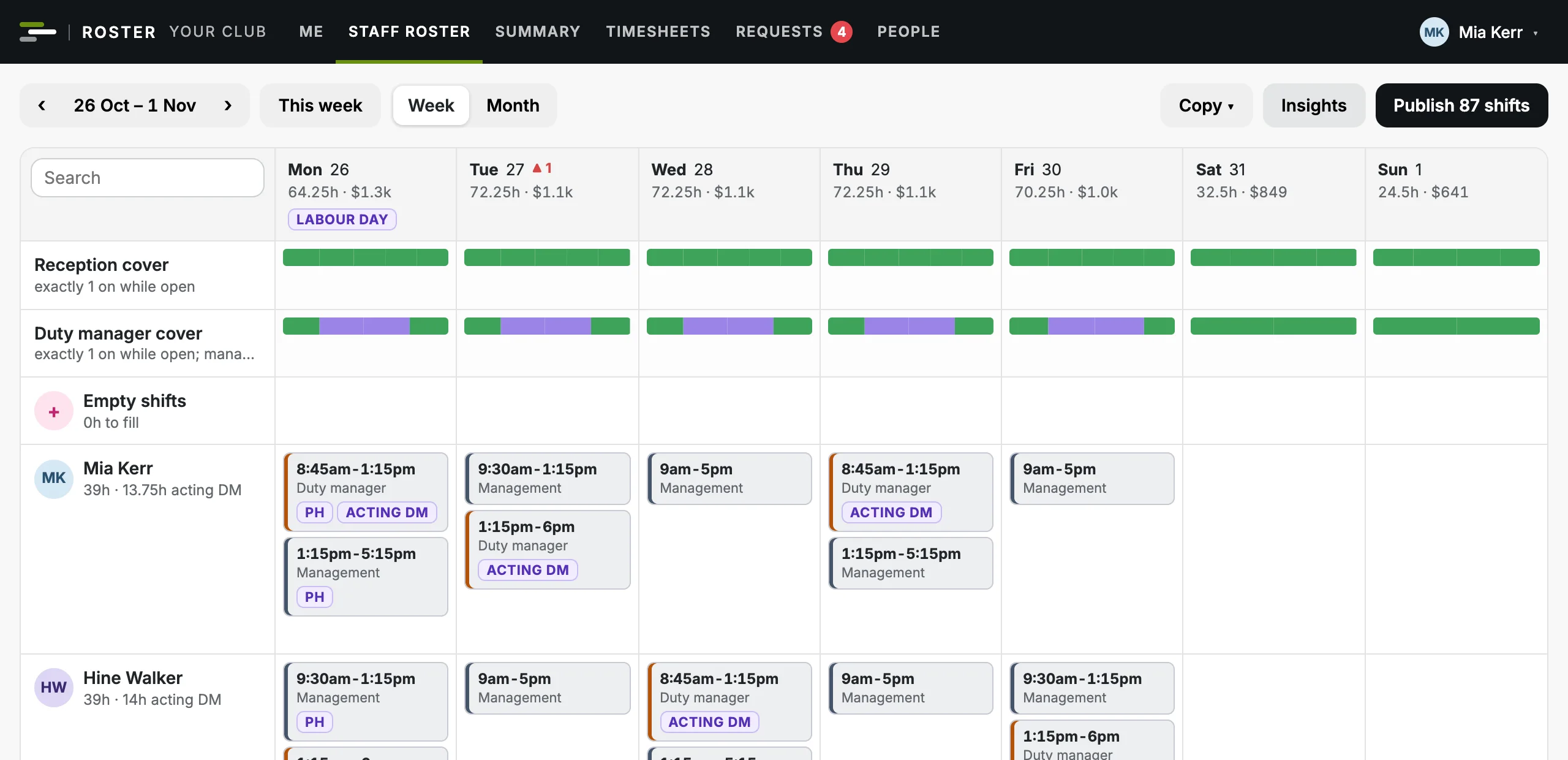
A week with Labour Day on the Monday: the holiday tag on the day and PH tags on its shifts
Make it yours

Your name on it. Your rules in it.

Every business gets its own web address, name, logo and colours, and sets its own opening hours, cover rules and budgets.

The staff roster in Summit Fitness's brand

Two made-up gyms and two made-up shops, each in its own colours. Status colours (green, amber, red) stay the same everywhere, because they mean something. See everything you can set

In control of who sees what

Owners see everything. Managers see what they run. Everyone else sees their own week.

Access by role

An owner, admins, managers and the team, each with their own part. Nobody sees the pay of anyone at their level or above.

No passwords to forget

Everyone signs in with their own email and a one-time code. Links in the app's emails never sign anyone in, so a forwarded email gives nothing away.

Every change logged

Who changed what and when, with the before and after, for shifts, timesheets, pay, access and settings.

Nothing is ever wiped

People are archived, not deleted, and a gym's classes are cancelled, never deleted, so history, pay and the change log stay intact.

First to accept, fairly

Two people can't take the same cover or shift: every claim is checked the moment it's saved.

Your data, yours to keep

Owners and admins can download a full backup at any time, and reports export as CSV.

Up and running without a project

You don't configure software. We set you up with you.

  1. Show us your week

    A walkthrough with your own roster, and your timetable if you run classes, so you can see how you'd look.

  2. We set you up

    Your brand, areas and people, your stores or your programmes and studios, your usual week and your rules.

  3. Your team sign in

    They sign in on their phone with their email and add the roster to their home screen. That's it.

Questions people ask

Do staff need to download an app?

No. They open the roster on any phone, sign in with their email and can add it to their home screen, where it works like an app. Nothing to install from an app store.

Does it handle public holidays?

Yes. New Zealand public holidays, including Matariki and Mondayised days, are built in, with time and a half and alternative holidays flagged on the roster.

Can it run more than one store?

Yes. A shop with several stores runs them all in one app, each with its own opening hours, closed days and cover. Running a group of clubs? Talk to us.

Does it do our payroll?

No. It exports approved hours as a CSV for your payroll system.

How much does it cost?

Shops are free for up to 10 employees, then $69 a month for each store. Gyms and clubs pay one monthly price set by the size of the team, instructors included, from $99. Plus GST. See the plans.

How do we get our people in?

We set it up with you, from whatever you keep your team in now.

See your week in Club Roster

A 30 minute walkthrough with your own roster. No commitment.