Rostering for gyms and clubs

Staff, classes and cover. One roster.

Club Roster builds your staff roster and class timetable side by side, fills covers before the group chat wakes up, and shows the cost against budget before you publish.

Made in New Zealand. We set your club up for you.
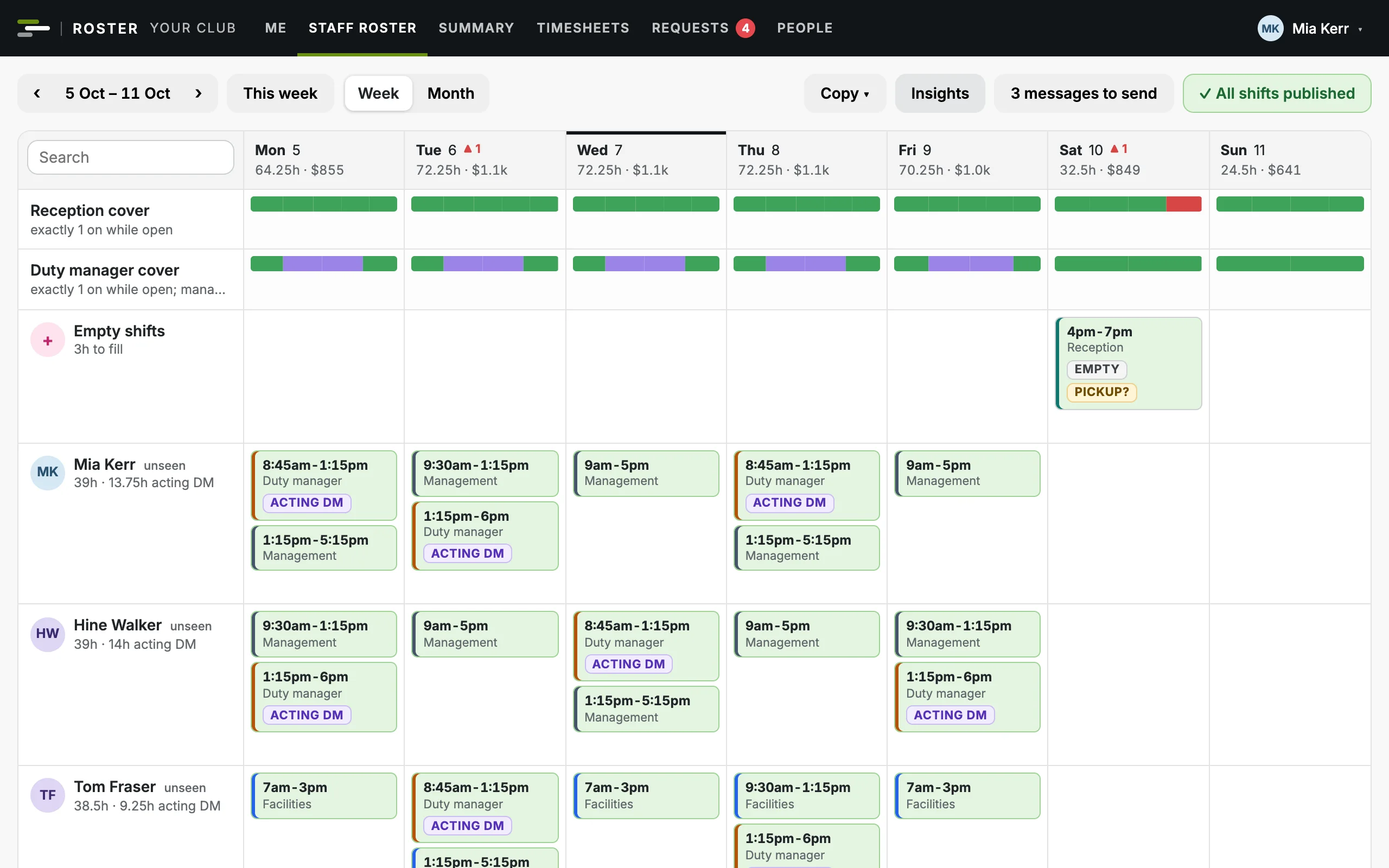
The staff roster for a week: cover bars for reception and duty manager, and each person's shifts, coloured by area
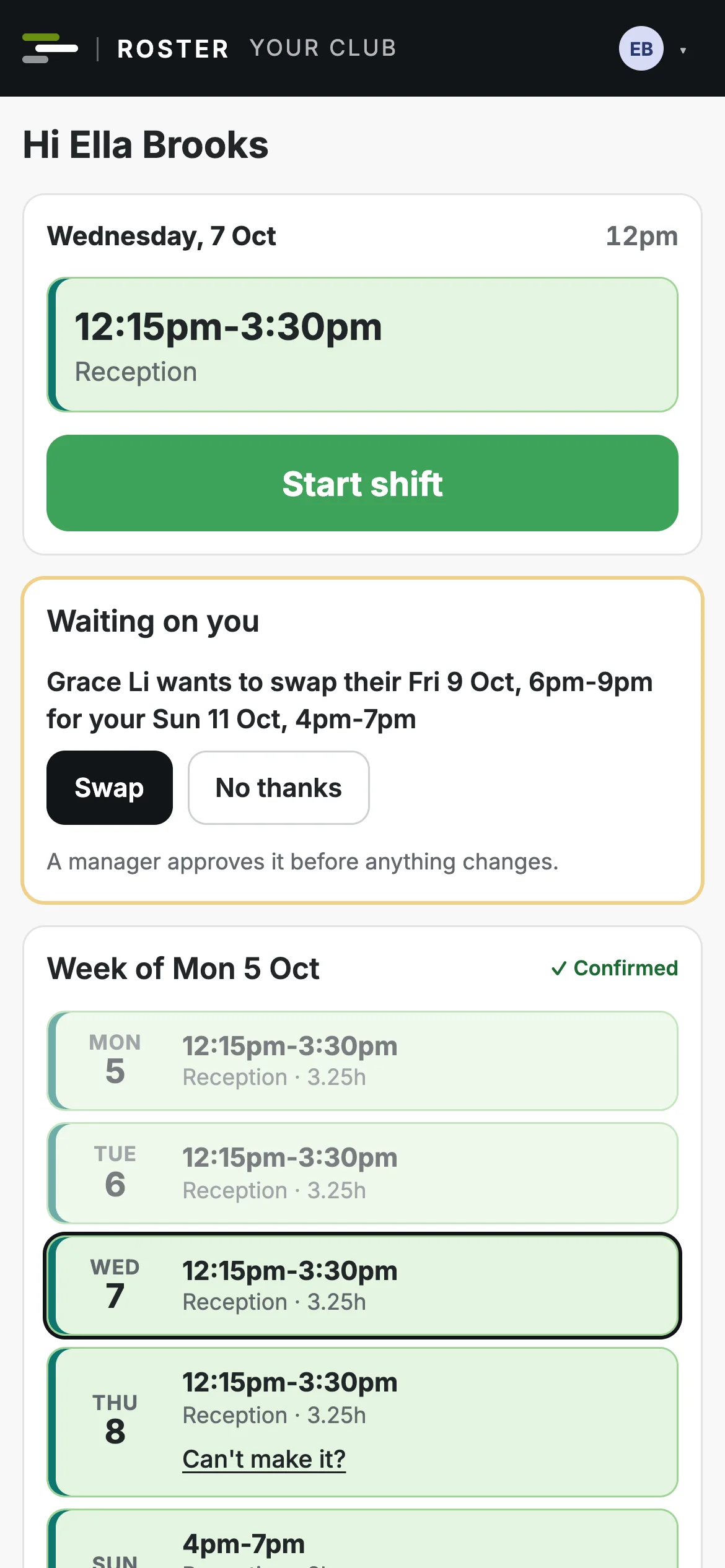
A team member's phone: today's shift with a Start shift button, and their week

Built for clubs that run on shifts and classes

  • Gyms
  • Group fitness studios
  • Boutique studios
  • Leisure centres
  • Clubs with coaches

Three jobs your managers juggle. One app.

Most rostering tools stop at staff shifts, and most gym software stops at member bookings. Club Roster is built for the bit in between: the people who run your club and the classes they teach.

Staff roster

Front desk, duty manager and team shifts, checked against your cover rules and New Zealand employment law as you build.

Staff roster

Classes and cover

Your timetable and instructors in the same place. When someone can't teach, the class goes to people qualified and free to take it.

Classes and cover

Costs and budgets

Wages, salaries and class fees against your monthly budgets, live while you build the week, not after payday.

Costs and budgets
Classes and cover

Cover, sorted before the group chat

An instructor who can't teach taps one button, no reason needed. Everyone qualified and free is offered the class, the best matches first, and the first to accept gets it.
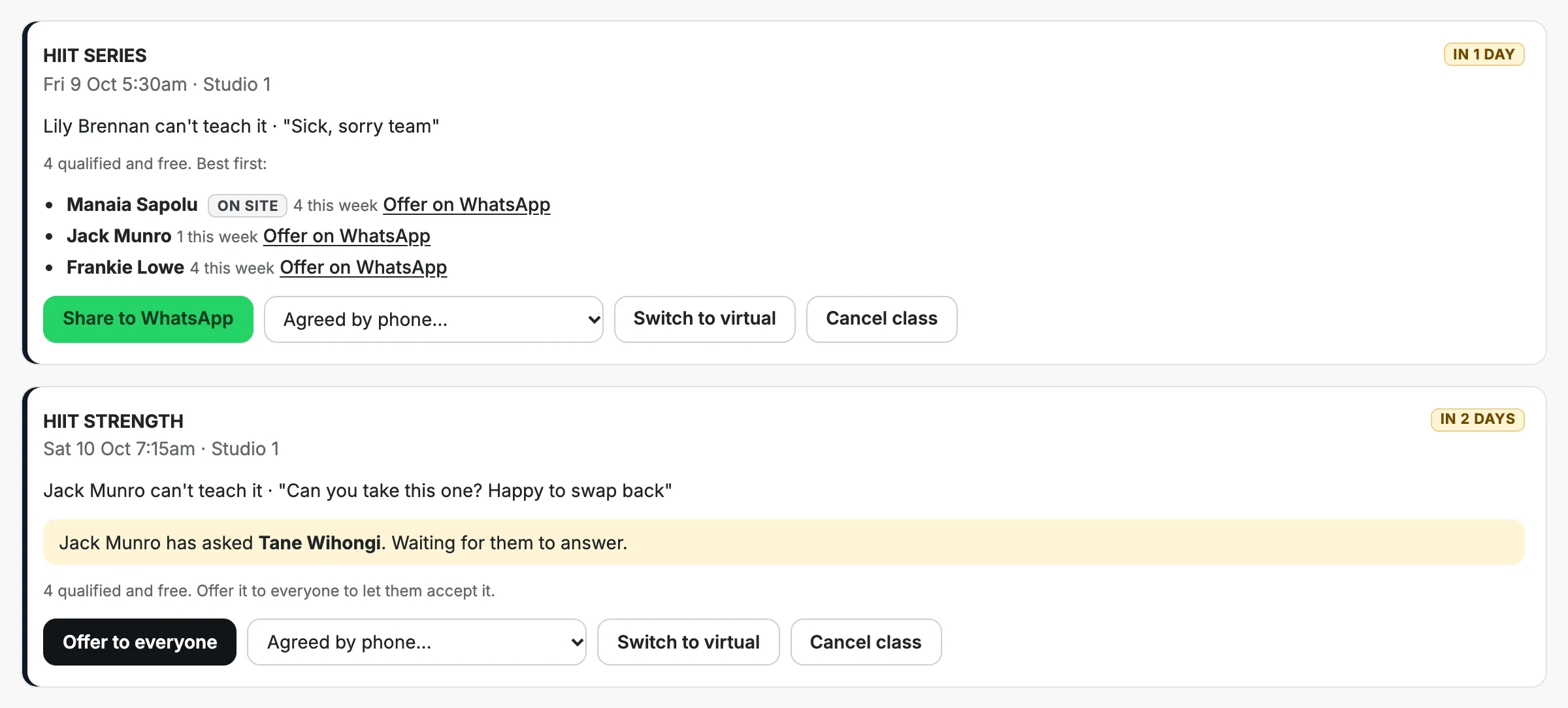
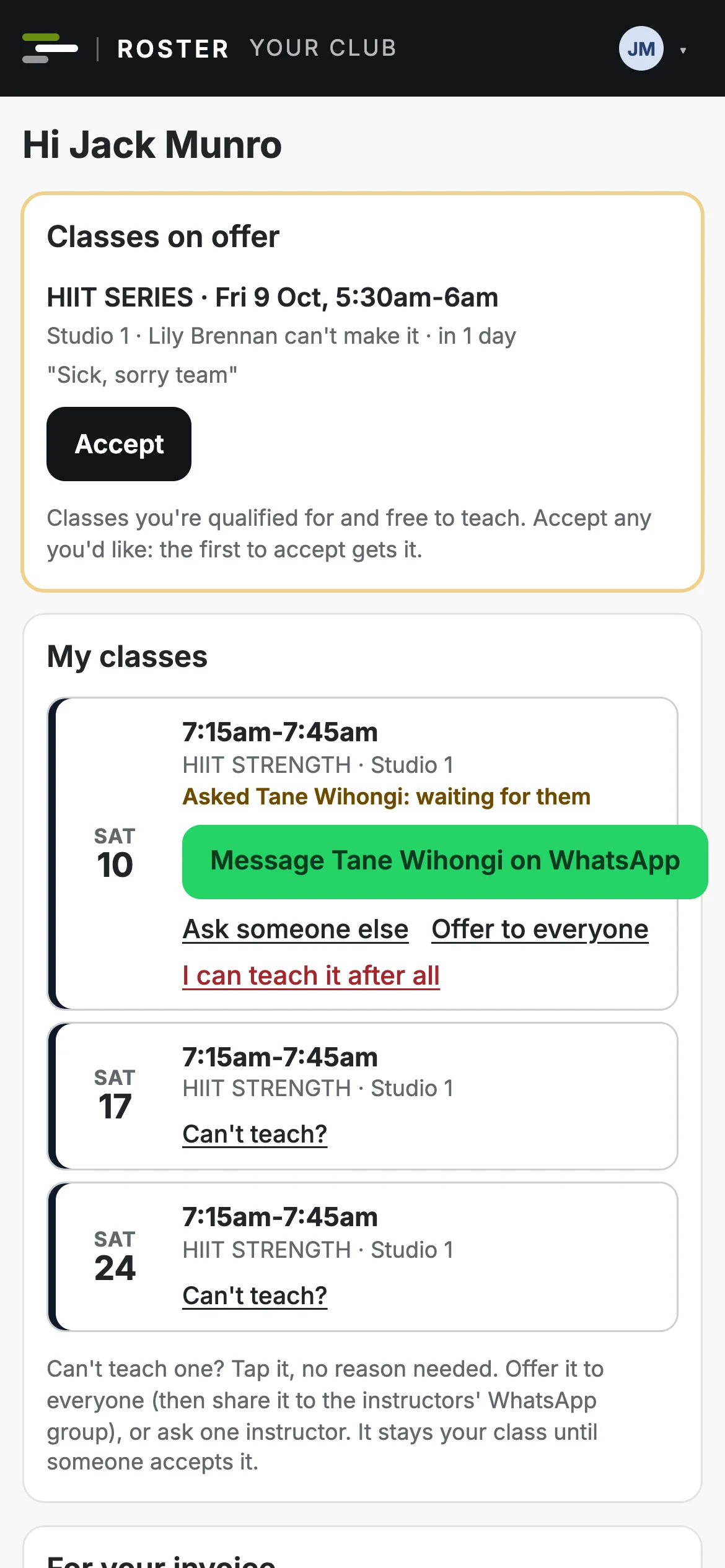
  • Offer it to everyone, or ask one instructor by name.
  • Share it to your instructors' WhatsApp group with a link straight to the class.
  • Covers are taken straight away, or wait for a manager to approve. Your choice.
  • Nobody is ever put on a class without agreeing to it.
The covers board: a class needing cover, the best instructors to ask, and buttons to share it or settle it
An instructor's phone showing a class on offer with an Accept button
The team app

Shifts and classes in their pocket

Staff and instructors get the roster on their phone without an app store: they sign in with their email and add it to the home screen.
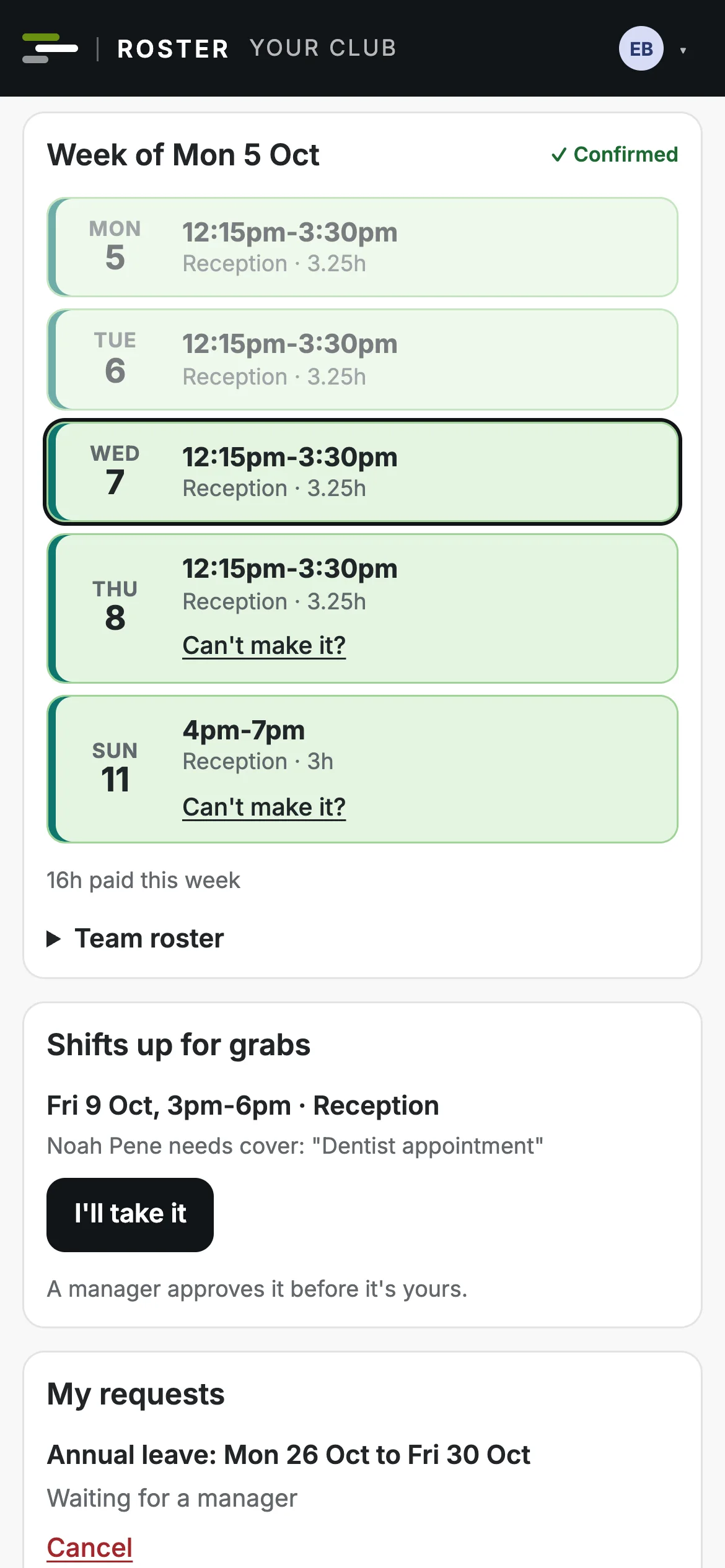
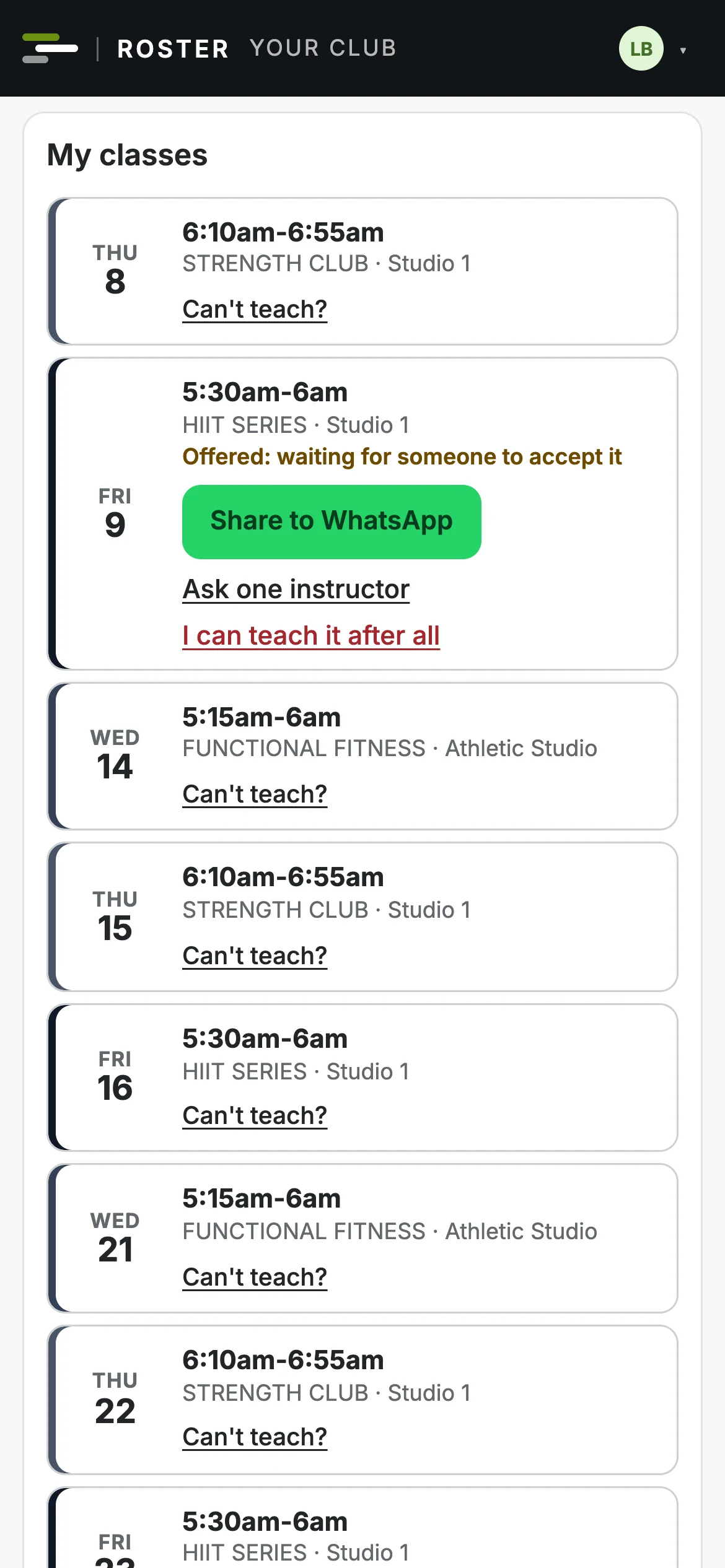
  • Shifts and classes, with a "Got it" when a new week is published.
  • Instructors offer a class for cover, or take one on offer.
  • Staff swap, give away or pick up shifts, and ask for leave.
  • Shifts and classes in their own phone calendar, kept up to date.
A team member's week on their phone, with Can't make it? under a shift
An instructor's classes on their phone, one offered for cover and waiting for someone to accept it
Time and pay

Timesheets and invoices that check themselves

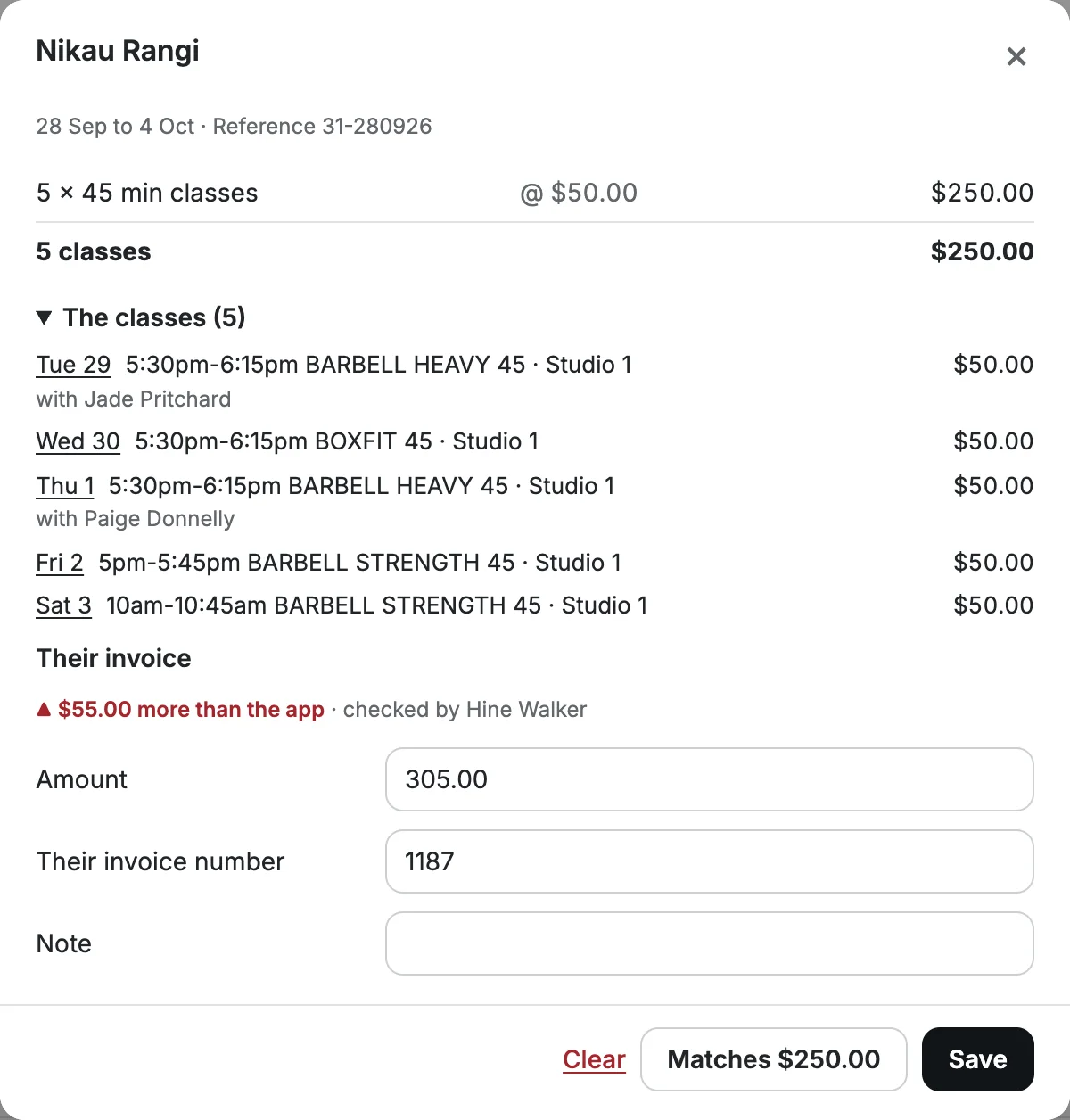
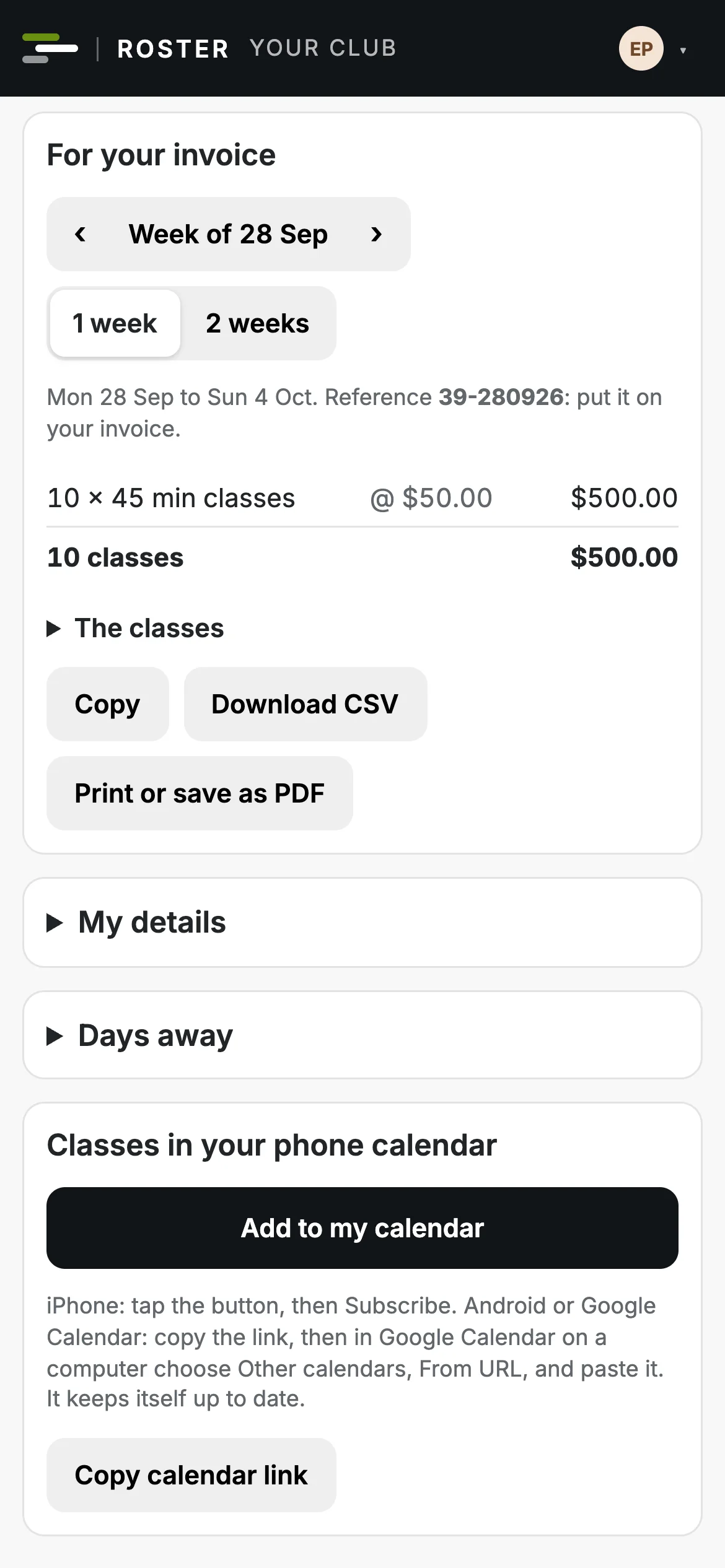
Clock-ins are matched to the roster, so late starts, early finishes and missed clock-outs stand out. Instructors get a statement of the classes they taught to invoice from, and you can check every invoice against it.
  • Approve timesheets in bulk and export approved hours for payroll.
  • Statements by week or fortnight, at each class's fee on the day.
  • Invoice checks: matches, more or less than the app, or changed since you checked.
  • Classes that ran with nobody on them are flagged to sort out.
An instructor's invoice check: their classes for the week, the total, and their invoice amount
An instructor's phone showing their statement for the week, ready to copy, download or print

Your kind of club

Gyms with group fitness

A front desk and duty managers on shifts, and a timetable of classes taught by instructors.

  • The staff roster and the class timetable side by side.
  • Cover offered only to instructors qualified and free to take it.
  • Wages, salaries and class fees against one set of budgets.

Group fitness and boutique studios

Spin, yoga, pilates or boxing: a busy timetable and a team of instructors paid per class.

  • Classes are offered and accepted, never assigned.
  • A fee for each class length, or an instructor's own rate.
  • Statements to invoice from, and invoices checked against them.

Leisure and community centres

Long days, seven days a week, with reception, facilities and programmes all needing people.

  • Cover rules for each area, checked every minute you're open.
  • Opening hours for each day, and the days you're closed.
  • Public holidays, weekly hours and long runs of days flagged.

Clubs with coaches

Sessions run by coaches who aren't on the payroll, alongside a small paid team.

  • Coaches are contractors: no clock in, no hours rules.
  • Who's qualified to take what, kept in one list.
  • A session shared to your coaches' WhatsApp group when someone can't make it.

What each person sees

Everyone signs in to the same app and sees their own part of it. Managers and owners on a computer or their phone; the team and instructors on their phone.

Owners

The whole club, and the numbers behind it

Every roster, timetable and cost, with the club's rules and money in your hands.
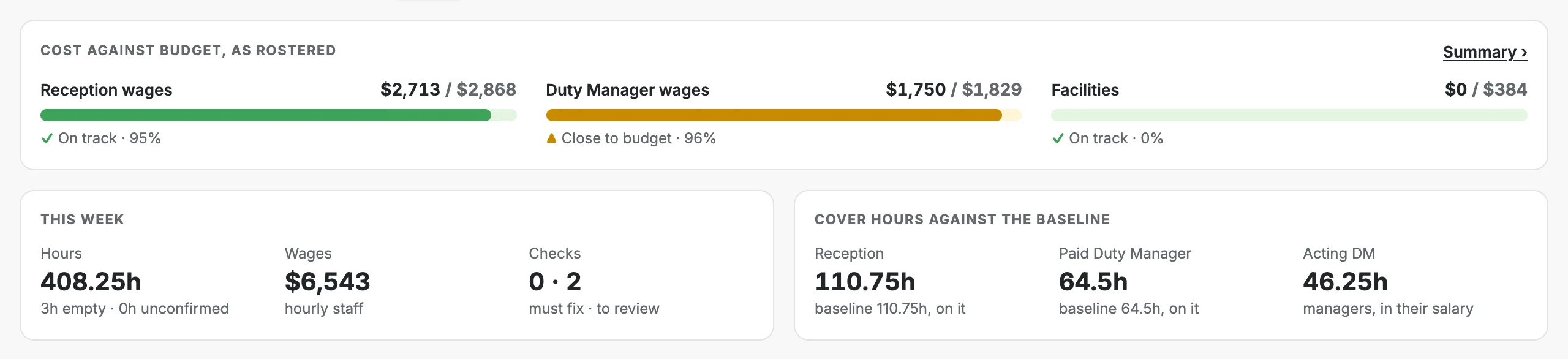
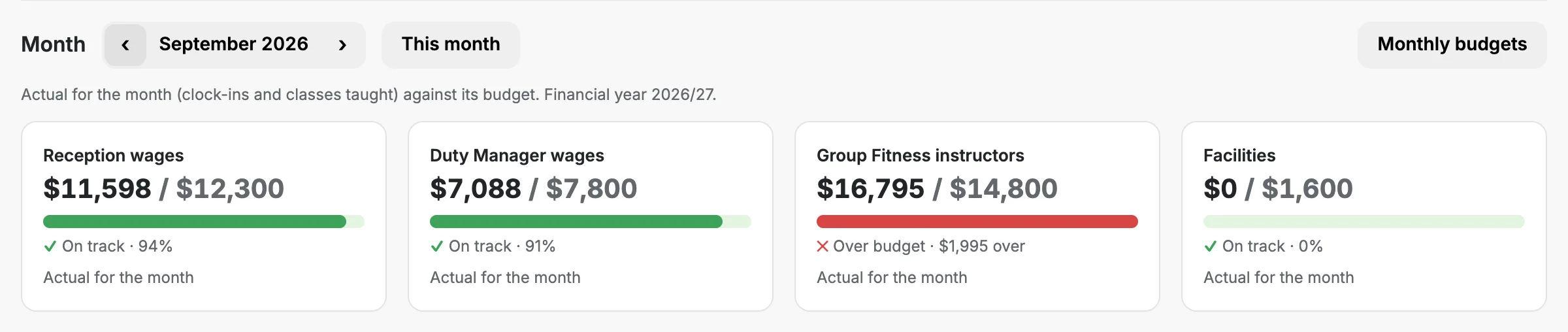
  • Budgets for each cost centre by month, and where the month will land.
  • Pay and fees, each kept with the date it changed.
  • Settings, who gets access, the change log and backups.
Cost against budget as rostered, by cost centre, with the week's hours and wages
Monthly budget cards for each cost centre against what was spent
Managers

Build the week, fill the gaps, approve the rest

A manager can run the staff roster, the timetable, or both, from a computer or their phone.
  • Build the week with the checks in front of them, then publish.
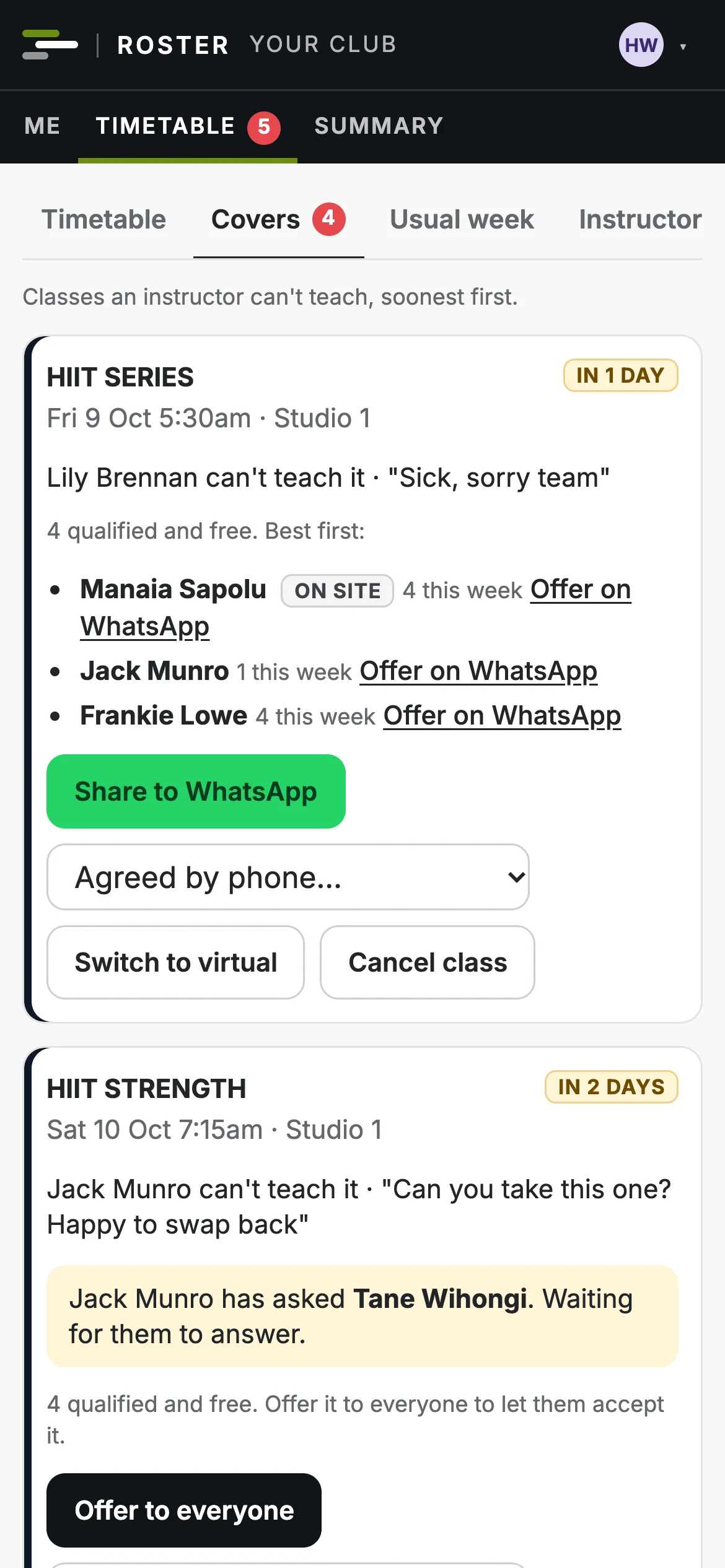
  • Sort a cover from their phone: the best people to ask, and a WhatsApp button.
  • Approve requests, leave and timesheets, and see any clash first.
A manager's phone showing the covers board: a class needing cover, the best instructors to ask and a Share to WhatsApp button
The team

Their week, on their phone

Front desk and the rest of the team see their shifts the moment a week is published.

  • Today's shift with a Start shift button, and the week ahead.
  • Ask for cover, swap, pick up an empty shift or ask for leave.
  • Set their usual availability, and add shifts to their calendar.
A team member's phone: today's shift with a Start shift button, and their week
Instructors and coaches

Classes on offer, and a statement to invoice from

Instructors see their own classes and any they could take, and are never put on one without agreeing.

  • Can't teach? One tap, no reason needed.
  • Accept a class on offer, or swap with another instructor.
  • Days away, their programmes, and a statement of every class taught.
An instructor's phone showing a class on offer with an Accept button

Questions clubs ask

Can our instructors keep using WhatsApp?

Yes. A class needing cover can be shared to your instructors' WhatsApp group with a link straight to it, and whoever accepts first on the app gets it.

Our instructors are contractors. Does that work?

Yes. Classes are offered and accepted, never assigned, and instructors are paid per class, with fees by class length and their own rates where they have them.

Can a manager see only their side of the club?

Yes. A manager can have the staff roster, the timetable, or both, and only sees the pay and fees for their side.

Does it replace our booking system?

No. Club Roster rosters your people; members keep booking classes where they do now. When a class changes, it reminds the manager to update the booking system too.

How do we get our timetable and people in?

We set it up with you, including importing your instructors from a spreadsheet.

How much does it cost?

One monthly price for your club, set by the size of your team, with instructors included: from $99 a month plus GST. See the plans.

See your club's week in Club Roster

A 30 minute walkthrough with your own roster and timetable. No commitment.