Your roster, not ours
Every gym, club and shop gets its own Club Roster: its own web address, name, logo and colours, set up around how it runs, with rules you can change any time.
Looks like yours
Your name and logo in the top bar, your colours through the app, and your icon on everyone's home screen.
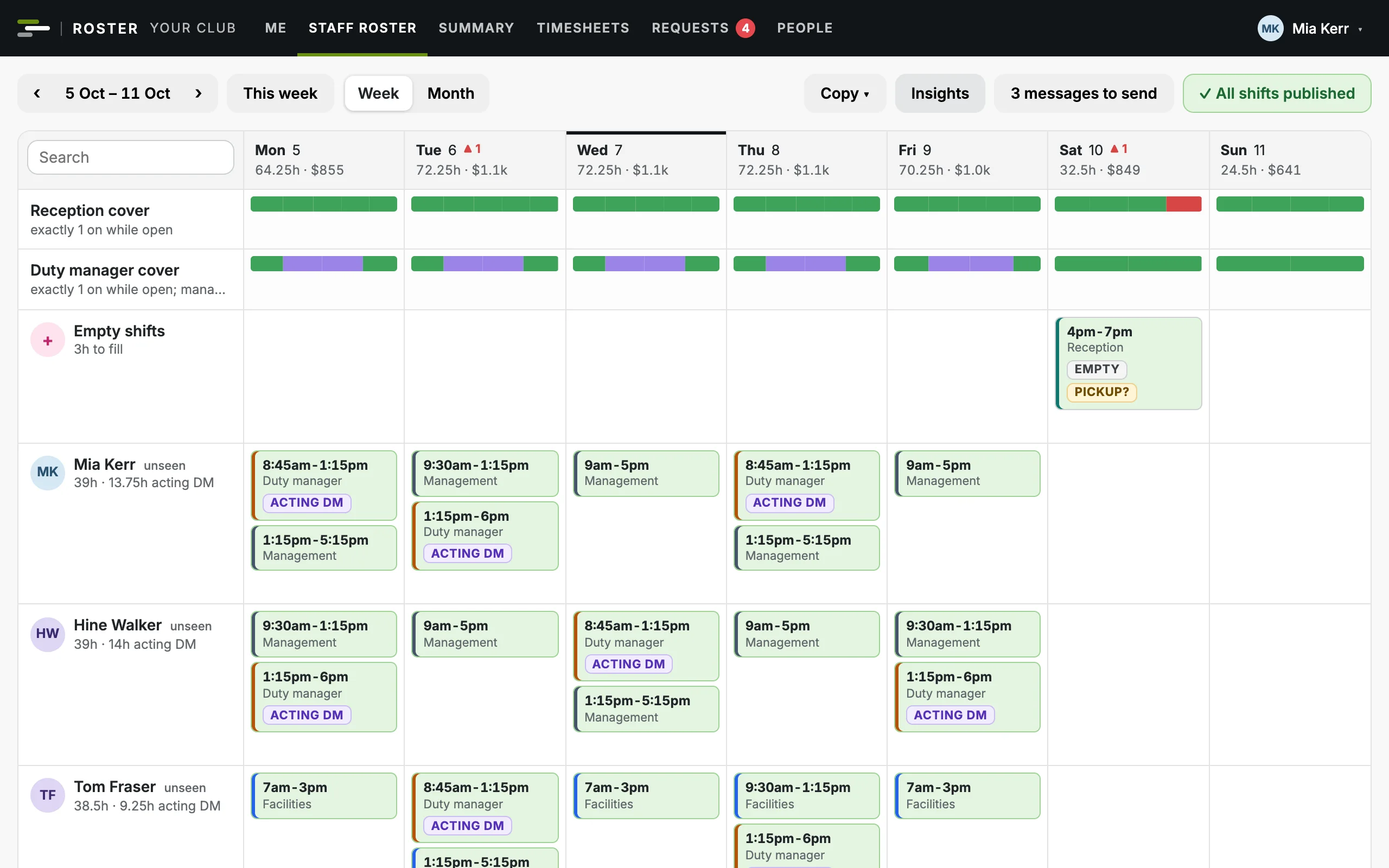
Three made-up gyms and two made-up shops, each in its own colours. Green, amber and red stay the same everywhere, because they mean something.
Your own address
Your own web address, like yourname.clubroster.co.nz.
Your name and logo
Across the app, on the sign-in page and in the emails it sends.
Your colours
On the top bar, the buttons and the highlights.
Your icon
Added to a phone's home screen, it's your icon and your name.
Shaped around how you run
There's nothing for you to configure. We set these up with you, so Club Roster works the way you do from the first day.
Your areas
The areas your team works in: reception and duty manager in a gym, say, or lead, floor and online orders in a shop.
- Retail
Your stores
Each store with its own areas, address, opening hours and closed days.
- Gyms and clubs
Programmes and studios
The classes you run, how long each one is, and the studios they're in, virtual classes included.
Your people
Your team, from whatever you keep them in now, with their areas and pay, and what each instructor teaches.
Your usual week
The regular staff roster, and a gym's class timetable, that every new week starts from.
Your cost centres
Wages, and a gym's class fees, grouped the way your profit and loss has them, one for each store if you like.
Your managers
Who your managers and admins are, and in a gym, who runs the staff roster, the timetable or both.
Your rules, yours to change
The owner and admins change these any time in Settings, and every change is logged.
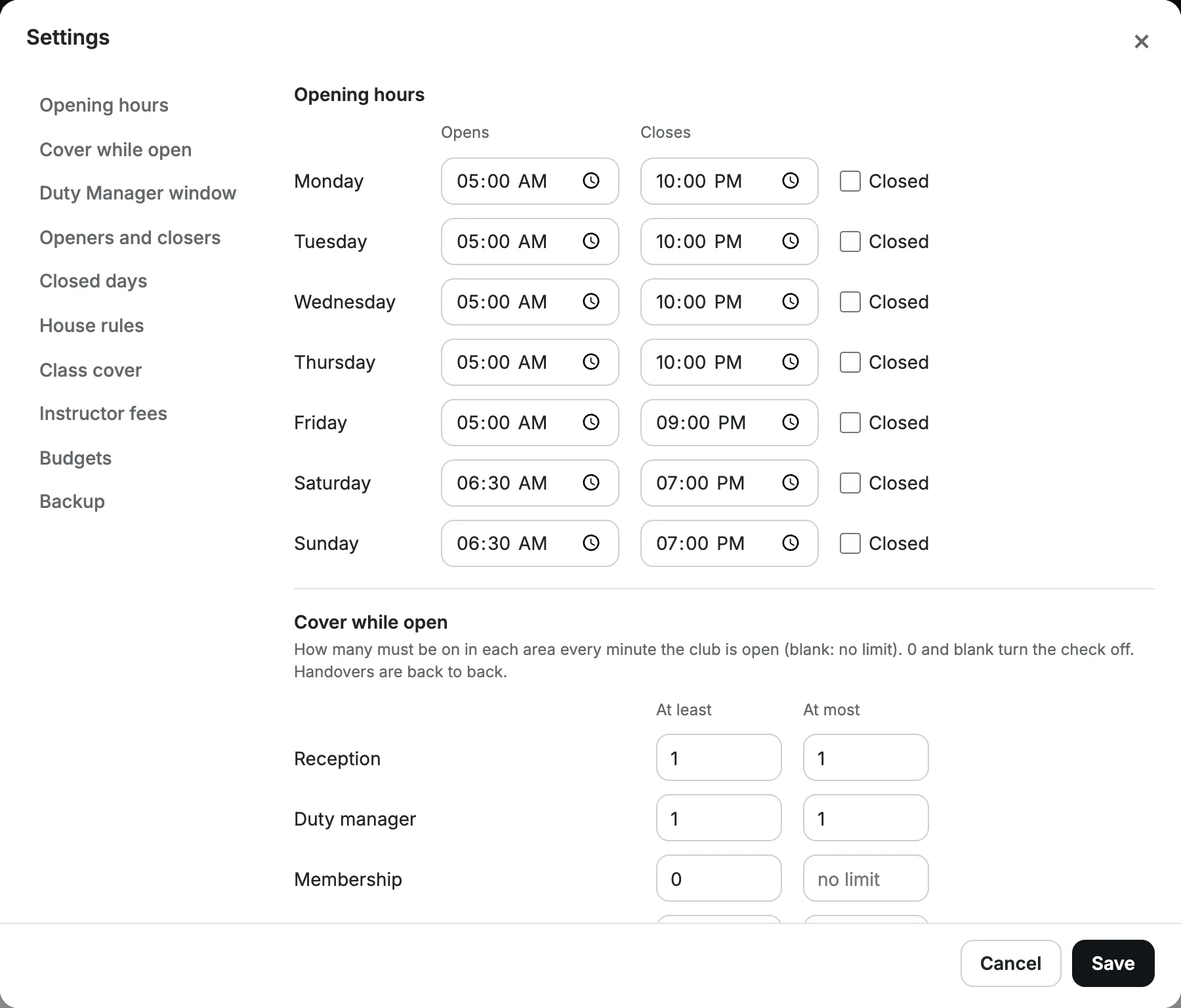
Opening hours
Opening and closing times for each day of the week, and the dates you're closed. A shop sets them for each store.
For example: 5am to 10pm on weekdays
Cover while open
How many must be on in each area, at least and at most, every minute you're open.
For example: exactly 1 on reception
Duty manager hours
When salaried managers act as duty manager, so paid cover in those hours shows as a cost.
For example: weekdays 8:45am to 6pm
Openers and closers
How early openers start before you open, and how long closers stay after.
For example: openers start 15 minutes early
House rules
Minimum wage, on-cost, and the weekly hours, days in a row and rest between shifts that raise a flag.
For example: flag under 10 hours' rest
Class cover
The first qualified instructor to accept gets the class, or a manager approves first.
For example: first to accept gets it
Instructor fees
A fee for each class length from the date it applies, and whether instructors see fees on their statement.
For example: 30, 45 and 60 minute classes
Budgets
Monthly budgets for each cost centre, your financial year, on-cost in or out, and when amber starts.
For example: amber from 95% of budget
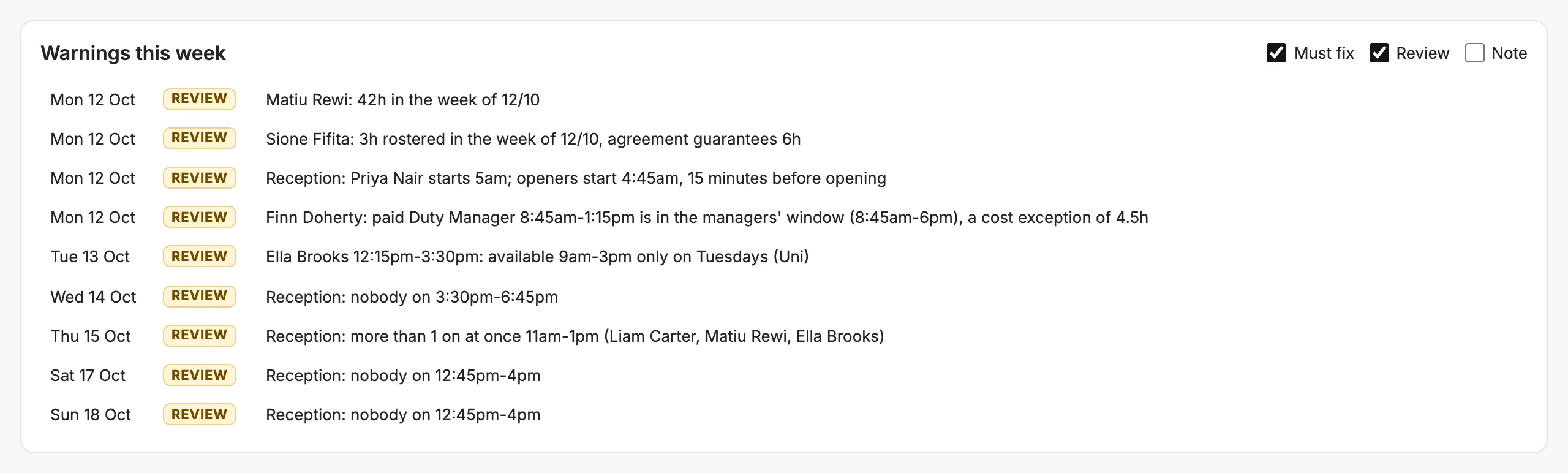
Change a rule, and the roster checks it
Ask for exactly one person on reception and every minute with nobody on, or two, is flagged. Change your opening hours and the gaps move with them.
- Warnings sorted into must fix, review and note.
- Checked as you build, before anything is published.
The right view for each person
The owner and admins decide who manages what. Pay is private upwards: nobody sees the pay of anyone at their level or above.
| Part of the app | Owner | Admin | Manager | Team member | Instructor (gyms) |
|---|---|---|---|---|---|
| Staff roster, timesheets and leave, every store in a shop | ✓Yes | ✓Yes | ✓Yes | Their own | ·No |
| Class timetable, covers and instructors (gyms) | ✓Yes | ✓Yes | ✓Yes | ·No | Their own classes |
| Pay | Change | Change, below them | See, below them | ·No | Their fees, if you choose |
| Budgets | Set | Set | See | ·No | ·No |
| Settings | Change | Change | ·No | ·No | ·No |
| Who has access | Everyone's | Managers' and the team's | ·No | ·No | ·No |
| Change log and backups | ✓Yes | ✓Yes | ·No | ·No | ·No |
In a gym, a manager can run the staff roster, the timetable or both. The owner can also let an admin see everyone's pay.
Simple for your team, safe for your business
Nobody has a password to forget, and you choose how people hear about changes.
No passwords
Everyone signs in with their own email and a one-time code.
Safe to forward
Links in the app's emails open the right page and never sign anyone in.
Emails in your name
A new week, a changed shift, a class on offer, an approval, with your name and colours.
Messages ready to send
For anyone without an email on file, the message is written for you to copy into a text.
WhatsApp, as you use it now
Share a cover to your instructors' group, or message the one you asked, with a link straight to the class.
In their calendar
Shifts and classes in each person's phone calendar, kept up to date as the roster changes.
Want it set up your way?
Bring your team list and your rules, and your timetable if you run classes. We'll show you your week in Club Roster.